Introduction
MacBook batteries are built to last — but not forever. Most are rated for around 1,000 charge cycles before noticeable degradation sets in, and at some point, every MacBook owner faces the same question: is it worth replacing the battery, and what will it cost?
MacBook battery replacement cost varies based on your specific model, warranty status, and who does the repair. Owners who skip the research often overpay at a premium service center — or underestimate the complexity of DIY on newer adhesive-heavy models. That misstep can cause damage that costs far more to fix than the battery itself.
This guide breaks down Apple's current pricing, what third-party shops offer, when it's free through AppleCare+, and how to decide whether a repair even makes sense for your situation.
Key Takeaways
- Apple charges $159 for most MacBook Air battery replacements and $249 for MacBook Pro models (out of warranty)
- AppleCare+ covers battery replacement for free if capacity drops below 80% — must be purchased within 60 days of Mac purchase
- Third-party shops typically charge less than Apple, though parts quality varies
- DIY works on pre-2018 models; skip it on newer adhesive-bonded designs — the repair risk outweighs the savings
- Your best option depends on your Mac's age, resale value, and whether other hardware is starting to fail
MacBook Battery Replacement Cost: What to Expect
Cost varies by model, warranty status, and repair path. Apple doesn't charge a single flat rate, so the final number depends on which Mac you have and how you get it serviced.
MacBook Air Battery Replacement Cost
Apple's out-of-warranty pricing as of early 2025:
- 11-inch and 13-inch MacBook Air: $159
- 15-inch MacBook Air: $198
These estimates come from Apple's Mac laptop repair page, which notes that final fees are determined after inspection, tax may apply, and shipping costs are added for mail-in service. The $159 and $198 figures have been confirmed by secondary sources including iFixit's February 2025 pricing table.
What's included: labor, the replacement battery, and a 90-day service warranty — or the remainder of your Apple warranty or AppleCare+ term, whichever is longer.
Older MacBook Air models may fall under Apple's "vintage" or "obsolete" classifications — vintage means discontinued 5–7 years ago; obsolete means more than 7 years. Mac laptops can still qualify for battery-only repair for up to 10 years from the date Apple last distributed the product, subject to parts availability.
MacBook Pro Battery Replacement Cost
Apple charges a flat $249 for most MacBook Pro battery replacements out of warranty — and this price applies consistently across screen sizes and chip generations. According to iFixit's February 2025 pricing table, the $249 rate covers:
- 13-inch, 14-inch, 15-inch, and 16-inch models
- Intel and Apple silicon versions (2016 through 2023)
MacRumors confirmed the same pricing after Apple raised battery replacement fees in March 2023. The higher cost compared to MacBook Air reflects more complex disassembly. MacBook Pro internals require more steps to access the battery without disturbing surrounding components.
The same 10-year service eligibility window applies to older MacBook Pro models, based on parts availability.
In-Warranty and AppleCare+ Coverage
Two coverage scenarios can eliminate the out-of-pocket cost entirely:
- Standard one-year warranty: Covers replacement only for manufacturing defects. Normal capacity degradation through everyday use is not covered.
- AppleCare+: Covers free battery service when your Mac's battery retains less than 80% of its original capacity. Apple designed MacBook batteries to hold that threshold through 1,000 complete charge cycles — drop below it while covered, and the replacement costs nothing.
AppleCare+ is available as a fixed-term, annual, or monthly plan. One detail worth knowing: it must be purchased within 60 days of your Mac purchase, so waiting too long locks you out of coverage entirely.
Key Factors That Affect MacBook Battery Replacement Cost
The difference between a $0 repair and a $249 repair often comes down to three things: your MacBook model, your coverage status, and who does the work.
MacBook Model and Year
Repair complexity — and therefore cost — depends heavily on how your battery is secured:
| Model Era | Battery Fastening | Repair Complexity |
|---|---|---|
| MacBook Air 2015 (Early) | Screws, no adhesive | 5-step guide, straightforward |
| MacBook Air M1 2020 | Stretch-release adhesive strips | 24-step guide |
| MacBook Air M2 2022 | Adhesive + screws, logic board removal required | 36-step guide |
| MacBook Air 15-inch 2023 | Adhesive strips, difficult access | Rated 3/10 repairability |
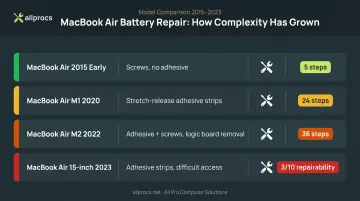
More steps mean more labor time — and higher costs, whether you're paying a shop or doing it yourself. Parts availability adds another variable: batteries for discontinued models can be harder to source, which sometimes pushes independent shop prices higher.
Warranty and Coverage Status
Your coverage status determines whether this repair costs nothing or the full retail rate:
- Under standard warranty with a defective battery: Likely free
- With active AppleCare+ and battery below 80% capacity: Free
- Out of warranty: Full cost applies — $159–$249 at Apple, varies at third-party shops
Repair Provider Choice
Your provider choice affects both price and risk:
- Apple Store / Genius Bar: Official pricing, genuine parts, Apple assumes full liability for any damage during repair
- Apple Authorized Service Providers (AASPs): Use genuine Apple parts at Apple's standard rates; labor fees may vary by location
- Independent local repair shops: Typically lower labor costs, faster turnaround, parts quality varies by shop
- DIY: Lowest upfront cost, but no warranty and significant damage risk on adhesive-heavy models like the M2
Apple vs. Third-Party Repair Options
Once you're out of warranty, the repair choice matters more than most people expect.
Apple Store or Authorized Service Provider
The main advantage of going through Apple isn't just the genuine parts — it's the liability coverage. If a technician damages your device during the repair, Apple takes responsibility, up to and including replacing the entire machine. Pricing is fixed and disclosed upfront.
Anyone with AppleCare+, owners of newer M-series Macs, or anyone uncomfortable with an uncertain outcome will find Apple the safer bet.
Independent Local Repair Shops
A good independent shop offers faster turnaround, lower labor costs, and the ability to actually talk through your situation with a technician — not just hand your laptop over at a retail counter.
That's the approach APCS (All Pro Computer Solutions) has taken in the North Bay Area since 1998. Their $100 diagnostic fee covers a full condition assessment — and may cover the resolution cost depending on the fix — so you understand exactly what you're dealing with before committing to a repair.
One practical note before you call: APCS sources batteries from retired laptops and Macs rather than new stock, so availability depends on your specific model. It's worth checking ahead:
- Sonoma County: (707) 400-7100
- Marin County: (415) 900-8928
- San Rafael (Northgate Mall): By appointment
Best for: Out-of-warranty Macs where Apple's pricing feels steep, or when you want a local technician who knows your device — not just the ticket number.
DIY Battery Replacement
DIY is a reasonable option for older MacBook models. iFixit's battery kits run roughly:
- MacBook Air (2010–2017 models): $69.99–$79.99
- MacBook Air Retina / M1 (2018–2020): $109.99–$129.99
- MacBook Pro models: $109.99–$139.99
For a 2015 MacBook Air with screwed-in batteries and a 5-step guide, DIY is manageable. For a 2022 M2 MacBook Air, the process runs 36 steps and requires logic board removal. Damaging a connector during that repair costs more than the battery job itself.
DIY also excludes any service warranty. If something breaks during the repair, that's on you — and Apple may flag the device if a non-genuine part is detected.
Signs Your MacBook Battery Needs Replacing
How to Check Battery Health in macOS
Hold the Option key and choose Apple menu > System Information, then select Power under Hardware. You'll find:
- Maximum Capacity — how much charge the battery holds relative to when it was new
- Cycle Count — how many full charge cycles have been completed
Apple's benchmark: batteries are designed to retain at least 80% of original capacity at 1,000 complete charge cycles. Once you're approaching or past that cycle count with declining capacity, degradation is expected.
These numbers tell part of the story. The other part shows up in how your Mac actually behaves day to day.
Behavioral Warning Signs
These often appear before macOS shows a formal alert:
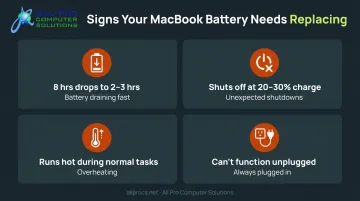
- Battery life dropping sharply — for example, from 8 hours down to 2–3 hours
- Unexpected shutdowns at 20–30% remaining charge
- Device running hotter than usual during normal tasks
- Needing to stay plugged in almost constantly to function
macOS Battery Condition Alerts
When macOS shows "Service Recommended" in the battery menu, Apple's system has detected reduced capacity or abnormal battery function. Older macOS versions may show "Replace Soon," "Replace Now," or "Service Battery" when you Option-click the battery status icon.
At that point, the battery can no longer be relied on away from an outlet. If portability matters to you, replacement should move up the priority list.
Is It Worth Replacing Your MacBook Battery?
The Decision Framework
Compare three numbers:
- Replacement cost: $159–$249 at Apple
- Mac's current resale value: A 2020 M1 MacBook Air sells for roughly $224–$329 on the used market; a 2022 M2 Air runs $442–$474
- Cost of a replacement machine: A new base MacBook Air starts well above $1,000
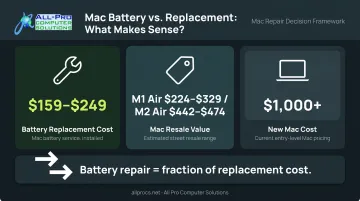
For most Macs in otherwise good condition, a $159–$249 battery replacement is straightforward math. You're extending a functioning machine for a fraction of replacement cost.
When It Gets Complicated
Battery replacement only makes sense if the battery is the primary problem. Before committing, check:
- macOS compatibility: MacBook Air 2020 and later supports macOS Sequoia; MacBook Air 2018 and later supports Sonoma. If your Mac is too old for current macOS, a new battery won't change its software support status.
- Other hardware issues: Slow performance, storage problems, or failing components mean a battery repair solves one of several problems — not the whole picture.
A good technician will review your device's overall health before recommending a battery repair — not just swap the part and send you home. Spending $159 on a battery when a Mac has two other failing components isn't a savings. It's a delay.
The Business User Calculation
If the battery checks out as the primary issue, the math shifts even more clearly for professionals. For small business owners especially, the cost of downtime often exceeds the repair fee itself. A MacBook limping along on 90 minutes of battery life costs real productivity every day — in lost flexibility, interrupted work, and the constant hunt for an outlet. Factoring that in, a $249 repair that restores a day's worth of portable battery life pays for itself quickly.
Frequently Asked Questions
How much does it cost to replace a MacBook Air battery?
Apple's current pricing is $159 for 11-inch and 13-inch MacBook Air models, and $198 for the 15-inch MacBook Air. Independent repair shops may charge less, though pricing varies by model year and parts sourcing.
How much does it cost to replace a MacBook Pro battery?
Apple charges $249 out of warranty for most MacBook Pro models from 2016 onward, regardless of screen size or chip generation. Independent shops typically offer lower pricing, but parts quality and technician experience vary.
How long does it take to replace a MacBook battery?
Apple Store and authorized shops typically complete in-store repairs in about two hours; mail-in service takes five or more business days. DIY repairs run 30 minutes on older screw-based models, but several hours on newer adhesive-bonded designs.
What are the signs my MacBook battery needs replacing?
Key indicators include significantly shorter battery life, unexpected shutdowns at partial charge, and macOS showing "Service Recommended." You can also check System Information under Power to see your battery's maximum capacity and cycle count.
Is it worth replacing my MacBook's battery?
For most MacBooks in otherwise good condition, yes — a $159–$249 replacement is far cheaper than buying a new machine. The math shifts if the Mac has other hardware problems or no longer supports current macOS versions.