Here's where many owners make their first mistake: assuming a dark screen means the entire display is dead and needs replacing. That's not always true. Backlight failure is its own repair category — and the cost, complexity, and right course of action depend heavily on which MacBook Air you have and exactly what's failing inside it.
This guide breaks down what MacBook Air backlight repair actually costs, what drives that cost up or down, and how to decide between a component-level fix and a full display assembly replacement.
Key Takeaways
- Third-party backlight and display repair runs roughly $129–$549 depending on model and repair type
- Older models (pre-2018) are far cheaper to fix; M-series models typically require full assembly replacement
- AppleCare+ covers accidental display damage for a $99 flat fee (plus tax)
- DIY is high-risk on M1/M2 models: True Tone calibration can be permanently lost
- Get a diagnosis before committing — a cable fix and a full replacement can differ by hundreds of dollars
How Much Does MacBook Air Backlight Repair Cost?
MacBook Air backlight repair doesn't have a fixed price. The final cost depends on two things: what's actually broken and which model you own. Miss either variable, and you'll either overpay for a full display replacement you didn't need, or budget too low assuming it's a simple cable swap.
Cost Ranges by Model and Repair Type
MacScreenRepair's published pricing gives the clearest model-specific picture on the market:
| MacBook Air Model | Repair Type | Typical Cost |
|---|---|---|
| A1369 / A1466 (2010–2017) | LCD panel repair | $129–$179 |
| A1932 / A2179 (2018–2020 Intel) | Screen repair | $299 |
| A2337 M1 (2020) | LCD repair | $299 |
| A2337 M1 (2020) | Full display assembly | $429 |
| A2681 M2 13-inch (2022) | Full display assembly | $499 |
| A2941 M2 15-inch (2023) | Full display assembly | $549 |
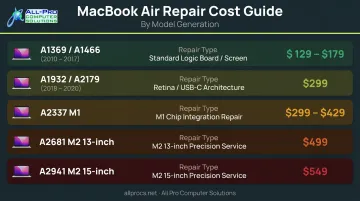
For component-level backlight circuit work — a blown fuse, failed filter, or driver IC — there's no standard published price. These repairs are quoted after diagnosis, and cost varies by shop.
Apple Store vs. Third-Party Pricing
That diagnosis-based pricing also makes it worth comparing where you get the work done — the difference in cost can be substantial.
Apple's official out-of-warranty display service requires an in-person inspection before pricing is confirmed. Third-party sources suggest Apple-authorized repairs typically run $450–$650, and Apple usually replaces the full assembly regardless of the actual fault.
Your repair path, in plain terms:
- AppleCare+ coverage: Apple sets a flat $99 fee (plus tax) for screen-only accidental damage — notably cheaper than any out-of-warranty option
- Out-of-warranty Apple service: Expect $450–$650, with full assembly replacement as the default approach
- Local third-party shops: APCS (Sonoma and Marin County) charges a $100 diagnostic fee — which in some cases covers the resolution itself — and has been servicing Mac hardware since 1998, with locations in Healdsburg and San Rafael (by appointment)
Key Factors That Affect MacBook Air Backlight Repair Cost
MacBook Air Model and Generation
The model year is the single biggest cost driver.
- 2010–2017 models (A1369, A1466): Display assemblies are accessible, parts are widely available, and repairs are straightforward. These are the cheapest MacBook Air repairs on the market.
- 2018–2020 Intel Retina models (A1932, A2179): Fewer third-party suppliers and bonded display construction pushed costs to the $299 range even for screen-level repairs.
- M-series models (A2337, A2681, A2941): Apple's repair manuals route all display repairs through full assembly replacement. The bonded construction means component-level display work is rarely practical, and parts alone run $399–$499 on iFixit.
Fault Location: Cable, Fuse, or Display
Three distinct failure points cause MacBook Air backlight problems, and they carry very different price tags:
- Backlight cable or connector — the flex cable between the logic board and display can become displaced after a drop or bend. This is the most fixable and cheapest scenario.
- Logic board backlight circuit — a blown fuse, failed filter, or driver IC on the board itself. Rossmann Repair Group identifies this as a common cause of no-backlight or dim-screen symptoms. A skilled technician can repair this at the board level, but it requires specialized tools and experience.
- Failed backlight LEDs or display hardware — when the panel itself is damaged, a full display assembly replacement is usually the only option.
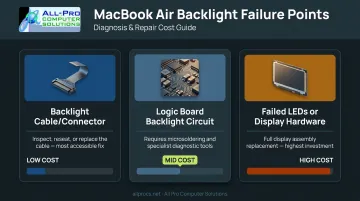
Getting an accurate diagnosis upfront determines both the repair path and the final cost — so don't skip it.
Parts Quality and Sourcing
Not all replacement displays are equal. Three tiers exist:
- Apple-genuine assemblies — available through Apple's Self Service Repair program; most expensive but highest compatibility
- Quality aftermarket panels — used by reputable third-party shops; performance varies by supplier
- Budget aftermarket parts — lower upfront cost, but often poor color accuracy and reduced lifespan
One important caveat for M2 owners: iFixit's M2 Air screen replacement guide notes that replacing the screen disables True Tone functionality when using non-calibrated panels. That's a real trade-off worth understanding before authorizing a repair.
Labor and Geographic Location
Parts quality directly shapes what you'll pay for labor, too — shops sourcing better components typically charge more per repair. The North Bay and greater Bay Area sit at the higher end of labor rates nationally, with hourly rates generally ranging from $45 to $85. Most reputable shops quote flat rates per repair rather than hourly, which is usually better for the customer since there's no ambiguity about the final bill.
Backlight-Only Repair vs. Full Display Replacement: Which Do You Need?
This is the decision that determines whether your repair costs $150 or $500. Most owners can't make it without a professional diagnosis — but understanding the indicators helps.
Signs You May Only Need a Component-Level Fix
- The laptop works normally on an external monitor while the internal screen is dark
- The problem appeared suddenly after a drop or a sharp bend near the hinge
- A faint image appears when you shine a flashlight directly at the screen
- The failure is consistent, not intermittent (intermittent issues often point to loose connectors)
These patterns suggest the backlight circuit or cable is at fault, not the display panel itself.
Signs You Likely Need a Full Display Assembly
- No image at all, even when the external monitor confirms the GPU is working
- Visible physical damage to the display housing or glass
- Liquid intrusion into the display area
- The model is an M-series MacBook Air — Apple's repair manuals and iFixit guides both use full assembly replacement paths for these models
Why Diagnosis Comes First
A shop that skips diagnosis and defaults to full display replacement could charge you $429 when a $100–$150 component-level fix was the right answer. The same logic works in reverse — assuming it's a cable fix when the panel has actually failed means paying twice.
A reputable repair shop will diagnose before quoting. At APCS, the $100 diagnostic fee clarifies exactly what's failing before any repair decision is made — and in some cases, that fee covers the fix itself.
Choosing the Right Repair Option: DIY vs. Professional
The DIY Reality
DIY repair kits exist for older MacBook Air models, and iFixit has detailed guides. But the repairability scores tell the real story:
- A2337 M1: 4/10 repairability (iFixit)
- A2681 M2 13-inch: 5/10 repairability (iFixit)
- A2941 M2 15-inch: 5/10 repairability (iFixit)
Even on older Airs, a successful display repair demands precise screwdriver work, careful cable handling, and patient hinge disassembly. On M-series models, the bonded display construction raises the stakes further — one slipped connector can damage the logic board and turn a $200 repair into a $600 one, with True Tone calibration lost in the process.
Stick to DIY only on 2010–2017 models, where parts are inexpensive and the assemblies are far more forgiving.
What to Look for in a Professional Shop
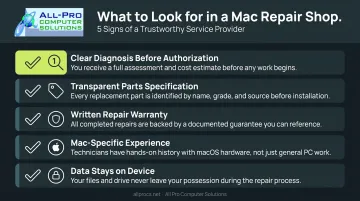
A good repair shop earns your confidence before you hand over the machine. Look for these qualities:
- Explains the diagnosis clearly before asking you to authorize any work
- Specifies the parts going into your machine (OEM vs. aftermarket)
- Backs the repair with a written warranty — Apple Authorized shops offer 90 days on parts and labor
- Has Mac-specific experience, not just general PC repair knowledge
- Keeps your data on the device; a display repair never requires accessing your files
APCS has been handling Mac hardware since 1998, with technicians who understand the difference between a backlight circuit issue and a panel failure — and who will quote based on what's actually broken. With locations in Healdsburg and San Rafael, they serve clients across Sonoma and Marin counties.
What Most MacBook Air Owners Get Wrong About Backlight Repair
Three mistakes come up again and again when owners bring in a MacBook Air with backlight problems:
- Skipping the diagnostic. Many owners authorize a $400+ assembly replacement without a proper diagnosis. A backlight cable or fuse repair might have cost a fraction of that.
- Choosing the cheapest quote without asking about parts. A $199 display replacement using a low-grade aftermarket panel can mean washed-out colors, no True Tone, and a second repair within the year.
- Waiting too long. A loose backlight cable causing intermittent dimming can progressively damage the connector housing or adjacent components. What starts as a $80–$150 cable fix can escalate into a $300+ board-level repair if ignored.
Conclusion
MacBook Air backlight repair spans a wide range — from a targeted cable or fuse fix on an older model to a full display assembly replacement on an M-series machine. The right answer depends on the model, the exact failure point, and who's doing the repair.
Before committing to any repair path, two things matter most: confirming whether you're dealing with a backlight-only failure or a full display failure, and getting a real diagnosis — not a guess. That distinction alone can be the difference between a $150 fix and a $600 replacement.
If you're in the North Bay Area and want a straight answer before spending anything, All Pro Computer Solutions offers honest diagnostics and Mac hardware repair backed by over 25 years of hands-on experience. A quick call can tell you exactly what you're dealing with.
Frequently Asked Questions
How much does it cost to repair a MacBook Air backlight?
Costs range from roughly $129–$179 for older A1369/A1466 models up to $499–$549 for M2 display assembly replacements at third-party shops. Apple-authorized out-of-warranty repairs typically run higher. AppleCare+ brings the cost down to a flat $99 fee for accidental display damage.
What are the symptoms of a MacBook Air backlight failure?
Three signs point to backlight failure:
- Screen appears very dim or completely dark while the laptop is still running
- A faint image is only visible when a bright light shines directly at the display
- Everything works normally when connected to an external monitor
Can a MacBook Air backlight be repaired without replacing the full screen?
On pre-2018 models, a cable or logic board fuse repair is often possible and significantly cheaper than a full replacement. On M-series models, Apple's repair paths and most shop workflows require full display assembly replacement due to bonded construction.
Does AppleCare+ cover MacBook Air backlight repair?
AppleCare+ covers accidental display damage for a $99 flat fee plus tax. If the backlight failure is a manufacturing defect rather than accidental damage, it may be covered under the standard warranty with no additional charge.
How long does a MacBook Air backlight repair take?
A cable or fuse repair can often be completed within a day at a well-equipped shop. Full display assembly replacements typically take 1–3 days, depending on parts availability for your specific model.
Is it worth repairing the backlight on an older MacBook Air?
For pre-2018 models with repair costs under $200, it's usually worth fixing — especially if the machine is otherwise running well. If the laptop is 7+ years old with other failing components, repair may cost more than the machine is worth, and replacement makes more sense.