Battery Diagnostics
We test weak, swollen, or failing HP laptop batteries to confirm whether the battery is the cause of blinking lights, short runtime, or charging that stops unexpectedly.

When your HP laptop will not charge and the white light keeps blinking, the issue may be the charger, battery, DC jack, USB-C port, or internal charging circuit. All Pro Computer Solutions diagnoses the full power path before replacing parts, helping home users and businesses restore reliable charging with practical, cost-conscious repair guidance.
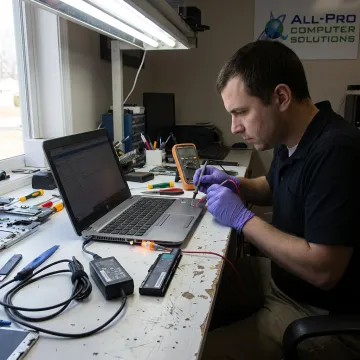
Focused laptop power diagnostics, charging repairs, and related device support for reliable everyday use.
We test weak, swollen, or failing HP laptop batteries to confirm whether the battery is the cause of blinking lights, short runtime, or charging that stops unexpectedly.
We check HP power adapters, cables, wattage compatibility, and connector fit to identify bad chargers before recommending a quality OEM or compatible replacement.
If charging only works at certain angles, we inspect and repair damaged DC-in barrel jacks or loose internal connections that interrupt power delivery.
For HP laptops using USB-C charging, we diagnose damaged ports, loose connections, and power-delivery problems that prevent consistent charging.
We evaluate the charger, battery, charging port, motherboard, and internal charging circuit to prevent unnecessary parts replacement and target the real fault.
If your HP laptop will not power on long enough to back up files, we can help stabilize the system and protect important data.
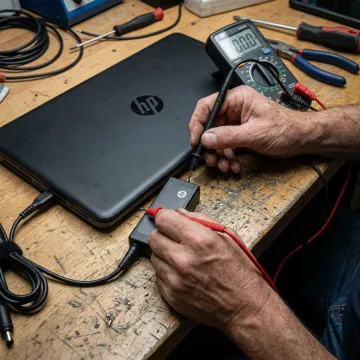
We start by identifying exactly what happens: blinking white light, no charging, battery drain while plugged in, charging at certain angles, or no power at all. This helps narrow the issue before opening the laptop.
Helping home users and businesses restore charging, power, performance, and access to important files.
"Absolutely fantastic service! My phone's screen was cracked, and GadgetFix had it fixed in no time. The repair was flawless, and the customer service was top-notch. Highly recommend!"

Get careful diagnostics, practical recommendations, and reliable repair support from an experienced local IT provider.
Serving homes and businesses since 1998 with reliable computer repair and IT support.
We test the full power path before recommending charger, battery, or port replacement.
Hardware repairs use quality parts selected for compatibility, safety, and long-term reliability.
Personalized help for home users, home offices, and North Bay businesses needing responsive service.
Experienced, practical help for laptop charging problems.

Technician
Richard is a highly skilled IT technician at All Pro Computer Solutions with a reputation for delivering fast, reliable results across the Bay Area and North Bay corridor. He specializes in emergency technical support, data recovery from failing drives, and building custom computers tailored for both business and personal use. Richard is known for his ability to break down complex IT problems into simple, actionable solutions—often sharing practical tips that help clients' computers run faster and more efficiently long after the service call. His work ethic and expertise have made him a go-to resource for dozens of satisfied clients who regularly recommend him to colleagues, neighbors, and fellow small business owners throughout Sonoma and Marin counties.
A blinking white light on an HP laptop usually points to a charging or power-state issue. It may indicate a low battery, adapter problem, loose charging port, battery fault, or internal charging-circuit issue. The exact meaning can vary by HP model, so the safest approach is to test the charger, battery, DC jack or USB-C port, and motherboard power path.
Talk with a technician before replacing parts unnecessarily.
Laptop charging repair and IT support available across North Bay homes and businesses.
North Bay
Service Area
Mon–Fri
Availability
25+ Years
Experience
Call to confirm availability and scheduling options.

Longstanding computer repair and IT support provider.
Word-of-mouth growth built on reliable service.
Compatible components used in hardware repairs.
Tell us what the blinking light is doing, your HP model, and whether the laptop powers on. We will guide the next diagnostic step.
For immediate assistance, feel free to give us a direct call at (707) 400 7100. You can also send us a quick email at apcs.rd@gmail.com.
For immediate assistance, feel free to give us a direct call at (707) 400 7100. You can also send us a quick email at apcs.rd@gmail.com.